
articles
Roll Your Own Video Server - Mac Mini-style

This article is featured in the latest podcast from The HT Guys
http://www.htguys.com/archive/2007/March09.html
When I bought my Mac Mini last year it was done so with the sole purpose to turn it into an HTPC. But after spending a year with it, the Mini has become so much more. We primarily use the Mini as our video server. We also have an ATSC tuner (El Gato EyeTV) connected to it so it is used as a back up DVR on those rare occasions that we have to record three programs at the same time. With a little networking know-how and a couple of applications the Mini becomes quite a powerful video server. First lets talk about the hardware
- Apple Mac Mini 1.66GHz Intel Core Duo with 1 GB of RAM $675
- NewerTech MiniStack V2 750 GB Hard Drive $450
- Netgear GS608 8 port Gigabit switch $65
- RemoteBuddy ($13) - With this application you won't need a mouse or Keyboard to access video playback features.
- DVDPedia ($18) - An incredible application for cataloging and playing your DVDs
- MacTheRipper - to backup your legally owned DVDs (this is technically not legal to do if you are breaking encryption)
- Handbrake - to rip the DVD into a mp4 file (same warning applies)
- VLC Media Player - the most versatile media player on Earth

 A True Media Server
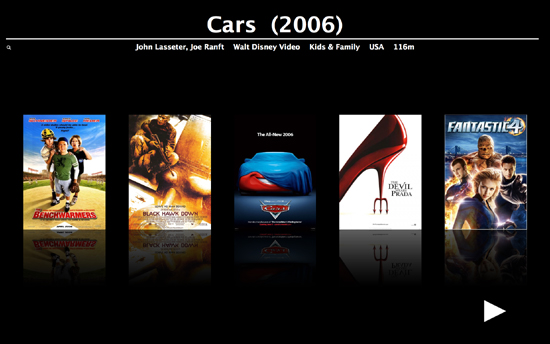
Where RemoteBuddy adds functionality DVDPedia adds style! This application turns the mini into a best of breed video server. The best way to describe DVDPedia is that it's a DVD cataloging application that can do so much more. One of the nicest things about DVDPedia is how easy it is to add information about your DVD titles. It's as simple as typing in the name of the DVD and hitting enter. The application goes out and scans multiple sources including Amazon and IMDB. It comes back with the DVD cover art and everything you want to know about the DVD including credits and a description. You can even add a link to the VIDEO_TS folder or any video file and the application will launch the appropriate player when called upon.
In the full screen mode, which is how you want to use it when browsing on your TV, you see the DVD cover art and can scroll through all your movies with the Apple remote and when you find one that you like you simply hit a button and your movie is launched and ready to go. There are a couple of features missing in DVDPedia but they are working on them. It would be nice if the application could display multiple rows of movies. It would make navigating large libraries easier. Having a brief synopsis of the movie displayed on the screen would also be good. Currently only the title and a few other facts about the movie are displayed. The last missing feature is the ability to search based on actor, director, or studio in full screen mode would turn the Mini into an absolute killer video server. The good news is that we have been in contact with the developers and these features plus a few more are on the roadmap. Both companies are very responsive to customers and reply to emails in a timely matter.
My movie library consists of 50 movies and increasing every day. I have bee using MacTheRipper to "Backup" only the main feature. This has two benefits for me. First the backup takes less space on the hard drive. But what I like the most about it is that the movie starts to play immediately. No coming attractions or menu, just the full quality video that plays right away. Finally, you don't need a Mini to use DVDPedia or RemoteBuddy so while you may not want to turn your iMac or MacBook into a video server these applications will add some cool features to your computer.
A True Media Server
Where RemoteBuddy adds functionality DVDPedia adds style! This application turns the mini into a best of breed video server. The best way to describe DVDPedia is that it's a DVD cataloging application that can do so much more. One of the nicest things about DVDPedia is how easy it is to add information about your DVD titles. It's as simple as typing in the name of the DVD and hitting enter. The application goes out and scans multiple sources including Amazon and IMDB. It comes back with the DVD cover art and everything you want to know about the DVD including credits and a description. You can even add a link to the VIDEO_TS folder or any video file and the application will launch the appropriate player when called upon.
In the full screen mode, which is how you want to use it when browsing on your TV, you see the DVD cover art and can scroll through all your movies with the Apple remote and when you find one that you like you simply hit a button and your movie is launched and ready to go. There are a couple of features missing in DVDPedia but they are working on them. It would be nice if the application could display multiple rows of movies. It would make navigating large libraries easier. Having a brief synopsis of the movie displayed on the screen would also be good. Currently only the title and a few other facts about the movie are displayed. The last missing feature is the ability to search based on actor, director, or studio in full screen mode would turn the Mini into an absolute killer video server. The good news is that we have been in contact with the developers and these features plus a few more are on the roadmap. Both companies are very responsive to customers and reply to emails in a timely matter.
My movie library consists of 50 movies and increasing every day. I have bee using MacTheRipper to "Backup" only the main feature. This has two benefits for me. First the backup takes less space on the hard drive. But what I like the most about it is that the movie starts to play immediately. No coming attractions or menu, just the full quality video that plays right away. Finally, you don't need a Mini to use DVDPedia or RemoteBuddy so while you may not want to turn your iMac or MacBook into a video server these applications will add some cool features to your computer.
 Not Just a Video Server
For me and many others the video serving capability alone is enough to seal the deal but that's not all I use the mini for. I also keep all my audio on the mini. With this my music is available to my Squeeze Boxes, my Xbox 360 (via connect 360), and other Macs or PCs on my network running iTunes. You can even use an Airport Express to stream music to your home theater system. The last thing I use my mini for is viewing pictures stored on my Mini. Using Frontrow or RemoteBuddy makes it a snap to select a photo album and have it displaying on screen in HD.
You also have the benefit of using the Mini for web browsing, email, and other computer related functions.
Not Just a Video Server
For me and many others the video serving capability alone is enough to seal the deal but that's not all I use the mini for. I also keep all my audio on the mini. With this my music is available to my Squeeze Boxes, my Xbox 360 (via connect 360), and other Macs or PCs on my network running iTunes. You can even use an Airport Express to stream music to your home theater system. The last thing I use my mini for is viewing pictures stored on my Mini. Using Frontrow or RemoteBuddy makes it a snap to select a photo album and have it displaying on screen in HD.
You also have the benefit of using the Mini for web browsing, email, and other computer related functions.