
articles
CinemaScope™ HDHT - Part I - The Concept
The following article is the latest in the CinemaScope™ series by Rodolfo La Maestra. Other articles in this series are as follows:
Anyone can relate to how CinemaScope brings the movie experience to the eyes, some of us can even remember the Cinerama experience over 40 years ago, almost everyone is familiarized with the term and meaning of HDTV, and with HT (Home Theater). So I created the term "CinemaScope HDHT" because it is actually blending the 3 concepts and technologies into one, and this series of articles is about implementing the 3 concepts, at your home, finally with consumer products. For some people the choice of 16:9 (aspect ratio of 1.78:1 for HDTV) has been cut short as aspect ratio and not wide enough to convey the typical feeling of wide-screen movies. If the movie itself has been filmed in a wider aspect ratio, like most movies do at 2.35:1, it means that the 16:9 HDTV set would have to show the movie image with top/bottom black bars to compensate for its wider geometry. It also means that the image would occupy a smaller space within the 16:9 cabinet frame of the TV, giving the impression of missing something above and below. Actually, those black bars use part of (waste) the precious resolution of the media and of the TV (panel, chip, etc). The movie image in between the bars ends up not as resolved as the Hi Def DVD media and the HDTV equipment make you believe they could be on their advertising schemes. That 1080p holy-grail TV you eagerly bought would actually end up using about 70% of its capable resolution for the actual 2.35:1 image, because the black bars use the other 30% of the available resolution for just black lines. As to the media side, the Hi Def DVD disc containing a wide-screen 2.35:1 movie would actually store those black bars in the disc above and below the image, wasting 30% of real state occupied by the video, and the player would play them back through your TV/projector as if they were part of the movie. Black bars, top and bottom, a wide-screen image in a wide-screen TV and still bars, hmmm... 16:9 HDTV was supposed to be the way of the future, a wide-screen solution wider than the legacy 4:3 NTSC system, but wait, let us look at the other side. We still tune to lots of programming recorded in 4:3, that when displayed on a 16:9 HDTV would have two pillar bars at each side to compensate for the different geometry of that "squarish" 4:3 image. Although one can still stretch the 4:3 image to fill the 16:9 frame of the TV, some viewers dislike faces that become too fat, heads or feet cut by the image expansion, game scores that are usually down below in the image on an ESPN sport program become out of the viewing area due to the expansion, etc. Some TVs have scrolling capabilities to let you move up/down edges of the viewing area to bring back pieces of the image, like bringing up the server player on a tennis baseline at the bottom of the screen, but most sets do not have such capability, they only have a couple of image stretching modes, non-standard modes that the TV designer expects you to like, if you know what I mean. Black bars again, now with pillars on the side, not much we could do about legacy but, hmmm... People thought that we were getting rid of black bars when switching from 4:3 TVs to 16:9 HDTVs, especially to view wide-screen movies, but unfortunately is not quite that way. Black bars, on the four sides, and sometimes all at the same time within the same program, are here to stay for the long journey of our new system of 16:9 HDTVs, whether you have a TV or a panel, because all HDTV cabinets are cut as 16:9. There has to be black bars because the physical aspect ratio of the TV cabinet cannot change to adapt to the aspect ratio of the media. So you think, there it goes my CinemaScope dream, not quite. If you are looking for a front projection solution for your HT wide-screen movies and for your HDTV viewing, there is something you could now do for the wide-screen dream on CinemaScope.
 Using the concept of "constant height", which is maintaining the same image height of the screen for both 16:9 and 2.35:1 material, an electronic /optical solution can display a wider image by making wider the sides of your viewing area, just like some elegant local theaters still do when the main feature is about to start and roll the large curtains laterally to let open a much wider screen. Get the popcorn now.
That is exactly the subject of these articles, how to implement your own "CinemaScope HDHT (High Definition Home Theater)" for wide-screen movies in a HDTV HT projection environment.
Remember those emotions flowing when viewing that large wide-screen image at the local theater, and you were fully immersed in the action? An image that excited the very wide angles of your horizontal vision in a way that no NTSC and no HDTV and no Hi def DVD could do, regardless of the resolution they might have, this about the effect of increasing aspect ratio, and increasing the angle of view, not just resolution.
CinemaScope HDHT certainly benefits with more resolution, but just having 720p, 1080i, or even 1080p would not do, they can only show more pixels, or show them faster to be more suitable to fast action on the image, but the geometric difference of most movies vs. the smaller aspect ratio of TV, NTSC or HDTV, can not be fully addressed by resolution increases alone. Although some people use their existing projection systems with zoom and masking to adapt to those differences, the resolution lines are still lost to black lines, behind the masks, but lost.
Over the last few years a few companies have been working overtime to bring wide-screen CinemaScope movie viewing to consumers at home, and brought to market several technologies together, electronic and optical, and now relatively affordable to regular consumers looking for their own HT projection environments now that 1080p projectors have become so affordable.
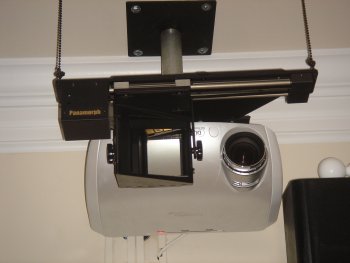
However, there are still some areas that a designer/installer has to carefully address to make sure the pieces of a system fit with each other, because a wide-screen anamorphic lens manufacturer needs to work with the projector manufacturer, and both need a scaler manufacturer with a suitable product, and a lens transport manufacturer, installation hardware manufacturer, etc.
Many of these companies are working hard to offer consumer-transparent harmonic multi-product solutions, and some projector manufacturers are even taking over the responsibility to deliver all the pieces manufactured by other vendors specially tailored to their projectors, but it is always a good idea to hire a local installer that knows about how to install a CinemaScope concept.
One can always add to the project the non-electronics part of making that CinemaScope home-theater looking like a real theater, with columns, dark ceilings, seats, etc., and that is not within the scope of these articles. The audio part is not covered, and is assumed the consumer would already have a multi-channel audio system.
Up until recently the coordination efforts of fitting the products was left to the creativity of individual home theater enthusiasts, people that had to perform various tailored solutions to make things work, some not designed to work together, no instructions in most cases, some were personal inventions of manually made anamorphic lens and other parts built for the pieces of the HT to fit well with the rest.
Some magazines take one area, and entice you to immerse your efforts for a full project without necessarily telling the whole story, weak areas that could go wrong, and affect the rest of the project, and most generally the overall budget.
Advertising is easy, reaching the final objective and investing your own money in a real project and technical solution is not, and the regular consumer should be made aware of the roadblocks and the collateral expenses that a dream CinemaScope project could entail.
No magazine covers the whole story, and you should be prepared before you start signing the first check. One thing is the theory, another very different thing is actually doing it, and so I decided to be a Guinea Pig and invest my own money on this concept, and help our readers with the articles.
I decided to dedicate a new room for this experience and technical challenge to see what is possible for a regular consumer with current electronics and optics. This is not about building and beatifying a HT with seats, columns, popcorn machines, curtains, star ceiling, that is easy, many companies do such projects, this is about how to get the CinemaScope video solution to work, you add your own audio.
Over the last couple of months I contacted several manufacturers to work together with them, and get their latest products, some of them were prototypes. I agreed with them that I would write these articles to tell the true story to the consumer and that they will collaborate in documenting the effort.
I also contacted local dealers, installers, an ISF calibrator, etc. exactly the same way any consumer would have to do, this was not about using my experience and capabilities of doing the project, this was about doing the steps that a regular consumer would have to do, and paying the bills any consumer would have to pay, no discounts, no breaks, no freebies. Just like other magazines do, don't they? This is the only way these articles could be of value to you the consumer.
Stay tuned for Part II, and welcome to the beauty of CinemaScope HDHT.
Using the concept of "constant height", which is maintaining the same image height of the screen for both 16:9 and 2.35:1 material, an electronic /optical solution can display a wider image by making wider the sides of your viewing area, just like some elegant local theaters still do when the main feature is about to start and roll the large curtains laterally to let open a much wider screen. Get the popcorn now.
That is exactly the subject of these articles, how to implement your own "CinemaScope HDHT (High Definition Home Theater)" for wide-screen movies in a HDTV HT projection environment.
Remember those emotions flowing when viewing that large wide-screen image at the local theater, and you were fully immersed in the action? An image that excited the very wide angles of your horizontal vision in a way that no NTSC and no HDTV and no Hi def DVD could do, regardless of the resolution they might have, this about the effect of increasing aspect ratio, and increasing the angle of view, not just resolution.
CinemaScope HDHT certainly benefits with more resolution, but just having 720p, 1080i, or even 1080p would not do, they can only show more pixels, or show them faster to be more suitable to fast action on the image, but the geometric difference of most movies vs. the smaller aspect ratio of TV, NTSC or HDTV, can not be fully addressed by resolution increases alone. Although some people use their existing projection systems with zoom and masking to adapt to those differences, the resolution lines are still lost to black lines, behind the masks, but lost.
Over the last few years a few companies have been working overtime to bring wide-screen CinemaScope movie viewing to consumers at home, and brought to market several technologies together, electronic and optical, and now relatively affordable to regular consumers looking for their own HT projection environments now that 1080p projectors have become so affordable.
However, there are still some areas that a designer/installer has to carefully address to make sure the pieces of a system fit with each other, because a wide-screen anamorphic lens manufacturer needs to work with the projector manufacturer, and both need a scaler manufacturer with a suitable product, and a lens transport manufacturer, installation hardware manufacturer, etc.
Many of these companies are working hard to offer consumer-transparent harmonic multi-product solutions, and some projector manufacturers are even taking over the responsibility to deliver all the pieces manufactured by other vendors specially tailored to their projectors, but it is always a good idea to hire a local installer that knows about how to install a CinemaScope concept.
One can always add to the project the non-electronics part of making that CinemaScope home-theater looking like a real theater, with columns, dark ceilings, seats, etc., and that is not within the scope of these articles. The audio part is not covered, and is assumed the consumer would already have a multi-channel audio system.
Up until recently the coordination efforts of fitting the products was left to the creativity of individual home theater enthusiasts, people that had to perform various tailored solutions to make things work, some not designed to work together, no instructions in most cases, some were personal inventions of manually made anamorphic lens and other parts built for the pieces of the HT to fit well with the rest.
Some magazines take one area, and entice you to immerse your efforts for a full project without necessarily telling the whole story, weak areas that could go wrong, and affect the rest of the project, and most generally the overall budget.
Advertising is easy, reaching the final objective and investing your own money in a real project and technical solution is not, and the regular consumer should be made aware of the roadblocks and the collateral expenses that a dream CinemaScope project could entail.
No magazine covers the whole story, and you should be prepared before you start signing the first check. One thing is the theory, another very different thing is actually doing it, and so I decided to be a Guinea Pig and invest my own money on this concept, and help our readers with the articles.
I decided to dedicate a new room for this experience and technical challenge to see what is possible for a regular consumer with current electronics and optics. This is not about building and beatifying a HT with seats, columns, popcorn machines, curtains, star ceiling, that is easy, many companies do such projects, this is about how to get the CinemaScope video solution to work, you add your own audio.
Over the last couple of months I contacted several manufacturers to work together with them, and get their latest products, some of them were prototypes. I agreed with them that I would write these articles to tell the true story to the consumer and that they will collaborate in documenting the effort.
I also contacted local dealers, installers, an ISF calibrator, etc. exactly the same way any consumer would have to do, this was not about using my experience and capabilities of doing the project, this was about doing the steps that a regular consumer would have to do, and paying the bills any consumer would have to pay, no discounts, no breaks, no freebies. Just like other magazines do, don't they? This is the only way these articles could be of value to you the consumer.
Stay tuned for Part II, and welcome to the beauty of CinemaScope HDHT.