
articles
Why 1080p? - Part 3 - Front Projectors
This article is the third in a series.
The other parts in the series are:
Part 1: Why 1080p?
Part 2: Why 1080p? - Part 2 - A Brillian(t) Case
In this article, I will introduce some of new 1080p front projectors with full 1920x1080p resolution, one from JVC D-ILA, another from Sony using similar LCoS technology (named SXRD) breaking the ground at $10,000 with high reviews (Ruby), and to wrap up, I will introduce four DLP front projectors implementing Texas Instruments' new true 1080p DLP DMD with 2 million plus mirrors (not "wobulated" as the earlier 1080p solutions). Some of these products are not yet available. Affordable 1080p front projection is finally here, the time might be right to start that Home Theater HD project of your dreams. Projectors with 1080p inputs can now be paired with Blu-ray players with 1080p outputs, which transport the 1080p content of Blu-ray discs. Hopefully, that feature would also be implemented in 2nd generation HD DVD players, the other format, in the near future, according with Toshiba. Because Hi-def players have the potential to supply a hi-end 1080p signal to a 1080p projector I will cover a bit of the Hi-def DVD subject; although this article is dedicated to 1080p front projectors, most of the discussion of 1080p connectivity and video processing would apply to other 1080p displays as well. For those readers that do not know, there are two competing formats in the Hi-def DVD market, one is Blu-ray, the other is HD DVD. Both formats use blue laser, discs with film based content of both formats have progressive 1080p/24Fps capabilities, and both types of players are backward compatible to play regular DVDs upconverted to 1080i/p resolution over permitted connections, such as HDMI (although HD DVD players are upconverting DVD to just 1080i for the moment). Toshiba just released two HD DVD players that are capable to read the 1080p resolution of the HD-DVD disc but output the HD signal as interlaced 1080i60 fields x second, which means the projector can not receive the 1080p content from a HD DVD disc due to a limitation of the player. Since the primary objective of most Home Theaters is to watch movies, and most movies are sourced from 24fps film and telecined into 1080p video, it is preferable that the equipment that plays the video is able to communicate with the projector in 1080p with minimum conversions. A 1080p24Fps movie displayed at that speed would show objectionable flicker. To avoid that flicker, your local Movie Theatre displays the 24 celluloid frames at double the speed by opening the film-projector's shooter twice for each frame, to total 48 frames per second. In progressive video, a projector would have to do something similar although not necessarily at that speed, usually at 60. Ideally, between the disc and the image displayed by the projector the equipment chain should avoid unnecessary interlacing conversions and video processing when processing 1080p film-based content. This requires that all connections of the equipment chain maintain the 1080p progressive format and resolution, within the player, at its output, on the cables, on the input stage of the projector, etc. In other words, not having 1080p outputs on the player would mean that film originated content is degraded from its original progressive form to an interlaced 1080i version using 2:3 pulldown (more below). However, having 1080p outputs on a player not necessarily means problem solved. The frame rate output of the player might not be compatible with the frame rate the projector accepts; the player might output a 60Fps up-framed version processed internally while the projector expects the original 24Fps; the reverse could be true. However, if both pieces offer multi frame rate capability it allows for testing to determine which one does what best, but it could also mean an impact of the expected overall 1080p performance if a handshake is reached by altering settings and not necessarily obtaining the best of their capabilities, individually and/or as a system. When selecting players and projectors (and scalers) check the features, frame rates, resolutions, input/outputs, etc. before assuming the 1080p player would provide the perfect conditions you expect for your 1080p projector. For example, Sony announced their player to output everything as 1080p 60Fps, but Pioneer indicated 1080p 24Fps (which matches well with their Elite plasmas), while HD DVD players do not output 1080p at all. If using scalers in between player and projector it would be ideal for the 1080p signal to pass-thru the scaler to avoid interlace processing, some scalers have pass-thru, some do not, in such case a direct connection to the projector bypassing the scaler could be the best choice for film content. However, the 1080p progressive signal could end up handled by an undefeatable interlace conversion before the projector displays it as 60p. Additionally, a scaler might help resolve a frame matching problem better than the other pieces if they multi-frame capable. In other words, the conversion performs 2:3 pulldown processing to convert the 24Fps progressive source into 30 frames of 60i interlaced fields (adding the 6 missing frames as 12 fields), and then converts those 60 interlaced fields to 60p full frames, a displaying speed typically used for 1080p front and rear projection (and 1080p panels). Unfortunately, this might be not the best processing choice available in the equipment chain in order to preserve the quality of 24Fps film progressive content. It could be better to maintain the progressive cadence of the film from the disc to the projector, and let the projector multiply the frame rate in the progressive domain. As mentioned above, some Pioneer Elite plasmas are known to be able to perform such functionality, the plasma panel accepts 24Fps but displays it as 72Fps, doing what they call 3:3 pull-down or Pure Cinema. The Brillian LCoS RPTV recently reviewed on the part II of this series displays at 120Fps, 5 times the 24Fps speed of the original film content. "Best and ideal" equipment is not easy to find and to match because although the selection of equipment with 1080p capabilities is growing, it is still limited. There might be no other choice than to accept some connectivity limitations on the player, the projector, and/or the scaler in between, as well as accepting undefeatable interlaced conversions when handling 24fps film based material. Regarding content originated as 1080i interlaced video, it would not need to go thru such 2:3 pull-down processing because it already has the 60i fields. However, to display 60i on 1080p projectors the 60i fields need to be deinterlaced and doubled as 60p frames. For performing that task, the assigned piece of equipment might/not be suited with certain functionality, such as motion-adaptive deinterlacing, pixel by pixel, motion calculation with less or more fields in advance, video processing chip used, etc. The overall result of the system could be impacted if the job is assigned to a player that lacks the features, and the scaler/projector has them but they are bypassed. In other words, one piece of the equipment chain might perform that function better than the rest; take your time in choosing it correctly. If the projector is assigned to perform the deinterlacing, the connection of player/projector would then be as 1080i, therefore, there is no gain in looking for absolute perfect 1080p connectivity for that particular application. If there is a scaler in between player and projector and is assigned to perform the deinterlacing job, the connection between player and scaler would be 1080i, the scaler deinterlaces and doubles to obtain 1080p/60Fps, outputs it that way, and the projector accepts it as 1080p/60Fps and maps the image to its chip to display it usually at the same speed of 60; those two pieces should connect as 1080p (and assumes the projector accepts 1080p/60Fps). As you see there might be several possibilities in the task of improving the overall 1080p picture, you might want to test each piece of the equipment chain to find the best combination of video processing, and that would only be possible if those pieces offer a variety of video processing capabilities and connectivity (1080i/p, various frame rates, etc). Although I did not mention 720p as alternative to the lack of 1080p inputs/outputs it should be noted that some equipment outputs and inputs offer 720p capability. Upscaling 720p to 1080p is viewed by some as a better choice than deinterlacing 1080i to 1080p. I particularly feel that reducing the spatial original resolution from 1920 of the disc to 1280 of the 720p transport format, to later upconvert it back to 1920 with interpolated pixels (the original pixels were already lost) for the final 1080p display, is a higher price to pay than the benefit of maintaining the 60fps temporal resolution of the 1080p/720p/1080p vertical resolution conversions of the p formats, specially considering that film content was the primary purpose for 1080p HT viewing, in other words: movies, no rapid sport videos.
Let us make the introductions:
 JVC
Introduced Feb 06
New Flagship
DLA-HD10K $25,000, TTM now, 3-chip D-ILA 'non-moving' mirror reflective technology, 1920x1080p, accepts 1080p 48/50/60 fps over DVI-D, high-resolution lenses with motorized zoom and focus with a 0-60% vertical offset, two models: a long throw with a lens throw distance of 2-3.8:1 (placement of the projector at the back of the theater), for a 10-foot screen, the projector could be placed anywhere from 20 to 38 feet from the screen, and a short throw model with lens throw distance of 1.5 - 2.0:1 to facilitate projector to be used for CRT replacement or rear screen applications, 2500:1 CR, 27db quiet fan noise, user-replaceable lamp with 2000 hrs life at $500. Faroudja, Silicon Optix, and Anchor Bay Technologies are planned to supply three different external digital signal processor packages with this model.
JVC
Introduced Feb 06
New Flagship
DLA-HD10K $25,000, TTM now, 3-chip D-ILA 'non-moving' mirror reflective technology, 1920x1080p, accepts 1080p 48/50/60 fps over DVI-D, high-resolution lenses with motorized zoom and focus with a 0-60% vertical offset, two models: a long throw with a lens throw distance of 2-3.8:1 (placement of the projector at the back of the theater), for a 10-foot screen, the projector could be placed anywhere from 20 to 38 feet from the screen, and a short throw model with lens throw distance of 1.5 - 2.0:1 to facilitate projector to be used for CRT replacement or rear screen applications, 2500:1 CR, 27db quiet fan noise, user-replaceable lamp with 2000 hrs life at $500. Faroudja, Silicon Optix, and Anchor Bay Technologies are planned to supply three different external digital signal processor packages with this model.http://pro.jvc.com/prof/Attributes/features.jsp?tree=&model_id=MDL101568&itempath=&feature_id=01
 Sony
VPL-VW100 (Ruby)
Shown again but not demo at CES was this Sony's projector using SXRD technology, TTM Nov 05, $10,000, 1080p 3x0.61" panels, little brother of Qualia 004, 15,000:1 CR with Advanced Iris Function on, 400-watt Pure Xenon Lamp ($1,000), accepts 1080p/60fps over DVI and HDMI, low fan noise 22dB, 1.8X Zoom, Lens Shift, DRC-MFv2, vertical keystone, auto input search, projection picture size 40 to 300 inches diagonally, although Sony recommended not larger than 120" (as below), projector shown at right.
At the SONY booth at CES 2006 the rep seemed to know this projector very well, he indicated that, in his view, the projector performs better scaling and video processing than most external scalers, he was not sure if the projector would disable the internal down conversion to 1080i when feeding 1080p to its input. It uses pixel-by-pixel motion adaptation deinterlacing. He recommended a Stewart white/gray screen not larger than 120" and 1.3 of gain; the Firehawk and DaLite screens were said to work well, with a minimum distance of 9" for maximum brightness. I viewed this projector several times in various environments and 90-110" screens, I consistently noticed the great resolution, but accompanied of a deficient light output for my taste. I suppose that the low light output could certainly please HT fans that love film Movie Theater environments, but I particularly prefer more lumens, and would rather choose a brighter projector such as the Optoma HD81, as long as the resolution and video quality could be equal or higher than the Sony, which looked that way at CES.
Texas Instruments has recently released a consumer DMD DLP chip with 2+ million mirrors, one per pixel for the full 1920x1080p HDTV resolution. The chip is targeted initially to the front projector market. Check all the new products in the DLP section. Most 1080p DLP implementations use a 960x1080 chip to produce a 1920x1080 image, the chip that has half the mirrors of the image pixel count. The DLP engine uses a mirror tilting technique at double the speed to complete the full 2 million-image pixels in two horizontal image shifts of 1 million mirror reflections each ("wobulation").
Sony
VPL-VW100 (Ruby)
Shown again but not demo at CES was this Sony's projector using SXRD technology, TTM Nov 05, $10,000, 1080p 3x0.61" panels, little brother of Qualia 004, 15,000:1 CR with Advanced Iris Function on, 400-watt Pure Xenon Lamp ($1,000), accepts 1080p/60fps over DVI and HDMI, low fan noise 22dB, 1.8X Zoom, Lens Shift, DRC-MFv2, vertical keystone, auto input search, projection picture size 40 to 300 inches diagonally, although Sony recommended not larger than 120" (as below), projector shown at right.
At the SONY booth at CES 2006 the rep seemed to know this projector very well, he indicated that, in his view, the projector performs better scaling and video processing than most external scalers, he was not sure if the projector would disable the internal down conversion to 1080i when feeding 1080p to its input. It uses pixel-by-pixel motion adaptation deinterlacing. He recommended a Stewart white/gray screen not larger than 120" and 1.3 of gain; the Firehawk and DaLite screens were said to work well, with a minimum distance of 9" for maximum brightness. I viewed this projector several times in various environments and 90-110" screens, I consistently noticed the great resolution, but accompanied of a deficient light output for my taste. I suppose that the low light output could certainly please HT fans that love film Movie Theater environments, but I particularly prefer more lumens, and would rather choose a brighter projector such as the Optoma HD81, as long as the resolution and video quality could be equal or higher than the Sony, which looked that way at CES.
Texas Instruments has recently released a consumer DMD DLP chip with 2+ million mirrors, one per pixel for the full 1920x1080p HDTV resolution. The chip is targeted initially to the front projector market. Check all the new products in the DLP section. Most 1080p DLP implementations use a 960x1080 chip to produce a 1920x1080 image, the chip that has half the mirrors of the image pixel count. The DLP engine uses a mirror tilting technique at double the speed to complete the full 2 million-image pixels in two horizontal image shifts of 1 million mirror reflections each ("wobulation").
 According to TI, the human eye would see the two images as one at that speed. The technique was criticized by the competition because it did not use a chip with the two million-pixel mirrors, as the other technologies do, such as LCoS (Sony's SXRD, JVC's D-ILA, eLCOS, etc). TI did not disclose any plans to supply a similar chip for RPTVs, and commented that it was a market/manufacturer decision to request to TI 1080p chips if they are demanded for RPTVs, likewise, no announcements were made by any DLP set manufacturer of RPTVs regarding new lines using this new chip.
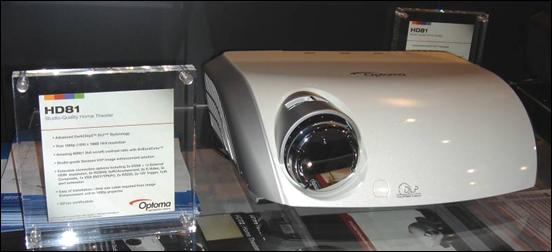
Some CES demos of front projectors using the new two million-mirrors-1080p-chip were stunningly good, like the Optoma HD81 1080p ($10,000, TTM 3Q06, below) on a 135" screen, probably the best 1080p FP in the price range.

 Sharp's XV-Z20000 DLP 1080p, near future flagship model.
$TBA (rumored at $12,000), TTM 3Q06, 1920x1080p resolution, Sharp's CV-IC III Video Scaling Circuitry, DVI/HDCP and HDMI inputs, 1000 ANSI, 10000:1 CR. Excellent demo with Blu-ray at CES (below), will accept 1080p when released, (left).
Sharp's XV-Z20000 DLP 1080p, near future flagship model.
$TBA (rumored at $12,000), TTM 3Q06, 1920x1080p resolution, Sharp's CV-IC III Video Scaling Circuitry, DVI/HDCP and HDMI inputs, 1000 ANSI, 10000:1 CR. Excellent demo with Blu-ray at CES (below), will accept 1080p when released, (left).
 Marantz DLP 1080p new projector VP-11S1, TTM TBA, $ TBA, shown as prototype, 700 ANSI, 5000:1 CR, 2 HDMI, 2 component, Gennum video processing (right).
Projection Design
 Action model 3 1080
True 1080p single DC3 DMD 0.95", Crystalio II (according to them the world's most technologically advanced video processor) with 4th generation broadcast quality algorithms for superior SD and HD video image quality, dual 7 segment color wheels and light formatters, DuArch illumination architecture featuring dual lamps, TI's BrilliantColor SLR technology, 24/7 operation warranty, Gennum's VXP Visual Excellence Processing, adjustable output brightness from 550 to 2500 ANSI lumens.
Stay tuned to the part IV of this "Why 1080p?" series, we will go deeper into the soon to be available Optoma HD81, a star in the CES 2006 show.
Action model 3 1080
True 1080p single DC3 DMD 0.95", Crystalio II (according to them the world's most technologically advanced video processor) with 4th generation broadcast quality algorithms for superior SD and HD video image quality, dual 7 segment color wheels and light formatters, DuArch illumination architecture featuring dual lamps, TI's BrilliantColor SLR technology, 24/7 operation warranty, Gennum's VXP Visual Excellence Processing, adjustable output brightness from 550 to 2500 ANSI lumens.
Stay tuned to the part IV of this "Why 1080p?" series, we will go deeper into the soon to be available Optoma HD81, a star in the CES 2006 show.